

Domain + Hosting Setup Get your domain and hosting set up quickly and professionally. We handle everything from registration to launch for a smooth, hassle-free start.
Domain + Hosting Setup

Learn how to set up your domain and hosting with this simple, beginner-friendly guide. Discover how to connect your domain, configure DNS, and launch your website quickly and securely. Avoid common setup mistakes and follow best practices for performance, security, and reliability. Perfect for businesses, startups, and new websites that need a fast, smooth launch.
Domain + Hosting Setup (Simple Guide)
Most people don’t fail because it’s hard.
They fail because it feels confusing.
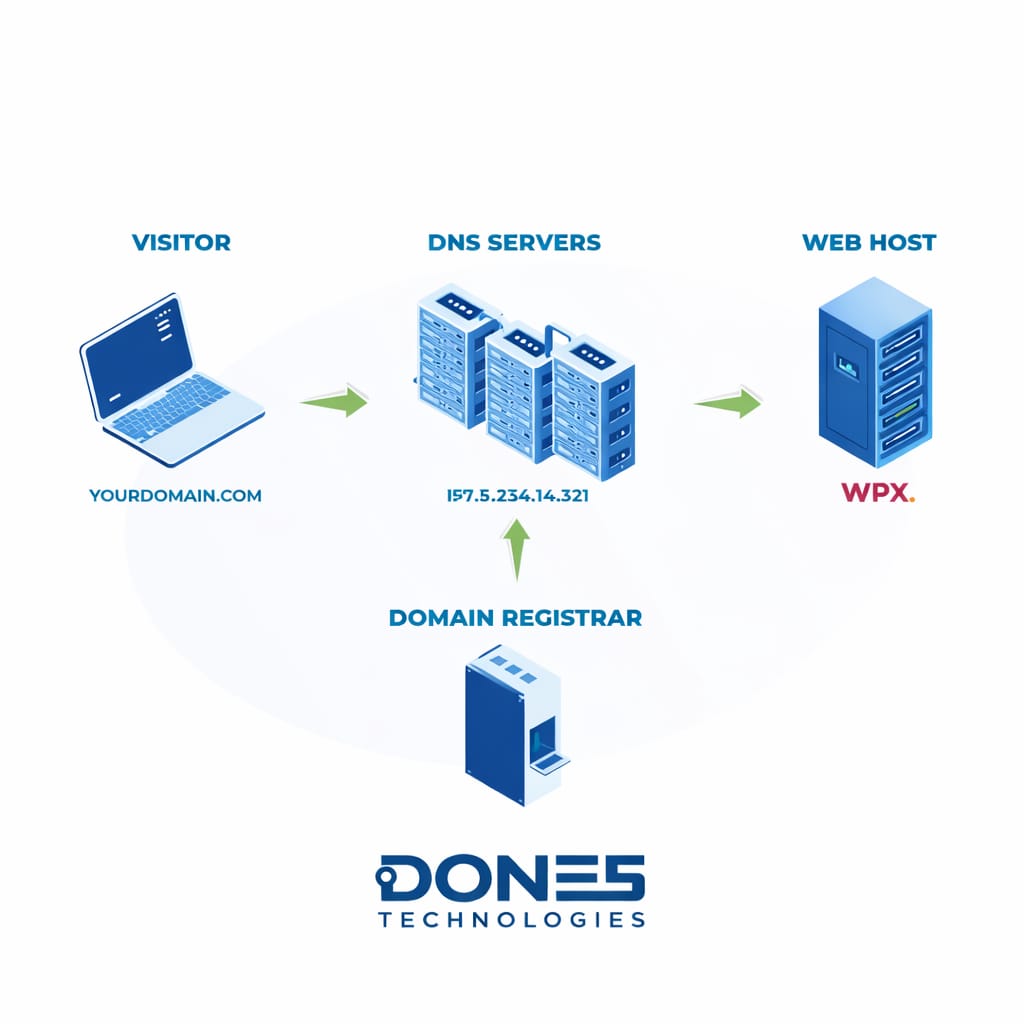
Domain = your website name (what people type in the browser, like yoursite.com)
Hosting = where your website’s files, images, and data are stored
DNS = the system that connects your domain to your hosting so your site can be accessed online
Domain brings visitors, hosting stores your site, DNS links them together.
1. Buy a domain
Choose and register your website name (e.g., yoursite.com). This is your online identity.
2. Buy hosting
Get server space where your website files will be stored and accessed by visitors.
3. Connect DNS
Link your domain to your hosting using nameservers so your domain points to your server.
4. Install your website
Use 1-click install (like WordPress) to set up your site and make it live.
That’s all—you’re ready to launch.
Reality
You don’t need to understand everything to start.
We simplify the entire process so you can focus on launching—not figuring things out.
Click here for more details.
Done 5 Technologies
Secure Infrastructure. Zero Compromise.
